
Free Amazon FBA Profit Calculator — Know Your Margins Before You List
Thinking of selling on Amazon.ca or Amazon.com? Before you source a single unit, you need to know your real profit — after Amazon’s referral fee, FBA fulfillment fees, storage, your cost of goods, and shipping. This free Amazon FBA calculator gives you a complete per-unit profit breakdown in seconds, no account needed.
Free Amazon FBA Profit Calculator
Calculate your real profit after Amazon fees, COGS, shipping, and advertising. Know your margins before you list.
Product & Cost Details
Fill in your product details and click Calculate FBA Profit to see your full profit breakdown.
Why use this Amazon FBA calculator free tool?
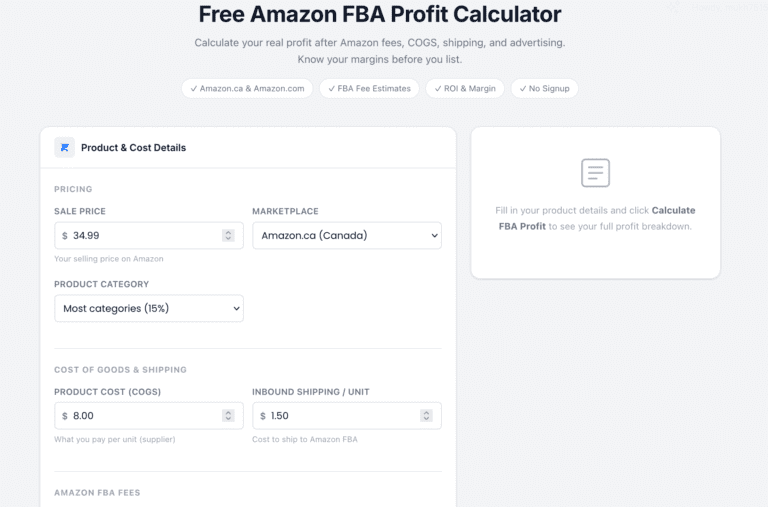
Unlike paid tools, this Amazon FBA calculator free tool gives you a complete profit breakdown — referral fees, FBA fulfillment fees, storage, COGS, PPC, and returns — all in one place. No account needed, no trial, no credit card.
What is Amazon FBA and how are fees calculated?
Fulfillment by Amazon (FBA) means Amazon stores, picks, packs, and ships your products for you. In exchange, you pay two main fees per unit:
Referral fee — a percentage of the sale price, usually 8%–15% depending on category. This is paid on every sale.
FBA fulfillment fee — a flat fee per unit based on size and weight. A small standard item under 1 lb costs roughly $3.22. A large standard item around 2 lbs is approximately $5.42.
On top of those, you also pay monthly storage fees based on cubic feet of space your inventory occupies.
How to use this Amazon FBA calculator free calculator
- 1. Enter your selling price and select your marketplace (Canada or US).
- 2. Choose your product category — the referral fee fills in automatically.
- 3. Enter your cost of goods and inbound shipping per unit.
- 4. Enter your FBA fulfillment and storage fees (use Amazon Seller Central's fee page to confirm exact figures).
- 5. Toggle on PPC advertising, prep costs, or a returns buffer if applicable.
- 6. Click Calculate FBA Profit to see your net profit, ROI, margin, and break-even price.
What is a good profit margin for Amazon FBA?
Most successful FBA sellers target a net margin of 20–30% and an ROI of at least 50–100% on their cost of goods. Here’s a rough benchmark:
| Metric | Weak | Acceptable | Strong |
|---|---|---|---|
| Net Profit Margin | Under 10% | 10% – 20% | 20%+ |
| Return on Investment (ROI) | Under 25% | 25% – 50% | 50%+ |
| Amazon Fees as % of Price | Over 35% | 25% – 35% | Under 25% |
| Break-even Units / Month | Hard to reach | Manageable | Low threshold |
Tips to improve your FBA profit margin
Negotiate COGS
Your cost of goods is the single biggest lever. Even a $0.50 reduction per unit compounds significantly at volume.
Watch your size tier.
Moving a product from “large standard” to “small standard” can cut your FBA fee by $2–3 per unit.
Control PPC spend
A high ACoS (Advertising Cost of Sale) is one of the fastest ways to kill an otherwise profitable product. Track your ad cost per unit carefully.
Avoid long-term storage fees
Inventory sitting in Amazon’s warehouse for over 180 days incurs extra fees. Forecast demand carefully.
Frequently asked questions
Is this Amazon FBA calculator free ?
Yes. This tool is completely free with no signup, no limits, and no paywalls. It’s part of RGmotive’s suite of free tools for Canadian entrepreneurs.
Does this work for Amazon.ca and Amazon.com?
Yes. You can switch between Canadian and US marketplaces. Note that you should enter fees in the currency of your marketplace.
Where do I find my exact FBA fees?
Log into Amazon Seller Central and use the FBA Revenue Calculator, or check the Fulfillment Fee tables under “Rates & Fees” for your marketplace.
Does Amazon charge GST/HST on FBA fees in Canada?
Yes. Amazon charges GST/HST on seller fees for Canadian accounts. This calculator does not include tax on fees — factor that in separately or consult an accountant.
What's the difference between margin and ROI?
Margin is profit as a percentage of your sale price. ROI is profit as a percentage of your investment (COGS + shipping). ROI is more useful for evaluating sourcing decisions.