
Free Invoice Generator for Canada
— With GST, HST & PDF Download
Create professional invoices with GST & HST tax in seconds. Free invoice generator for Canadian freelancers, contractors & small businesses. No sign-up.
$ Invoice Generator
Professional invoicing made simple
Invoice Details
Your Company
Bill To
Line Items
Totals
Notes
Invoice Template
Branding
What is the Free Invoice Generator ?
It’s a browser-based tool that builds a professional invoice instantly. You fill in your details, add line items, choose your tax type, and download a clean PDF — no account, no watermark, no monthly fee.
It handles:
- GST (5%) for most of Canada.
- HST (13–15%) for Ontario, New Brunswick, Nova Scotia, PEI, and Newfoundland .
- PST for British Columbia and Saskatchewan.
- QST for Quebec.
Custom tax rates for US or international clients
Discounts, deposits, and due dates
How the Free Invoice Generator Works?
- Step 1:Enter your business name, address, email, and phone number. This becomes the "From" section on your invoice.
- Step 2: Fill in your client's name, email, and billing address in the "Bill To" section.
- Step 3: Add your service or product line items. Enter a description, quantity, and unit price for each item. Click "+ Add Item" to add more lines.
- Step 4: Set your tax rate. Select GST (5%) or HST based on your province. Leave it at 0% if you are not registered for GST/HST.
- Step 5: Add a discount amount if needed, and customize your notes (e.g. payment terms, bank info, thank you message)
- Step 6: Choose your invoice template style — Modern, Minimal, Classic, Corporate, Black, or White — and pick your brand colours.
- Step 7: Click "Download PDF" to instantly save your professional invoice. No signup, no email required.
Why Freelancers and Contractors in Canada Need a Proper Invoice Tool
Canada has one of the highest concentrations of freelancers per capita in North America. Millions of Canadians work as contractors, consultants, gig workers, or self-employed professionals. But invoicing is often an afterthought.
Here’s why proper invoicing matters:
Tax compliance: The CRA requires proper invoices for any business charging GST/HST. A sloppy invoice can create problems during tax season.
Getting paid faster: Invoices with clear due dates and payment terms get paid an average of 8 days sooner than informal billing.
Looking professional: A clean invoice builds client trust and positions you as a legitimate business — not just a side hustle.
Record-keeping: Clean invoice records make year-end bookkeeping much easier.
Step by Step Guideline - How to use free Invoice Generator
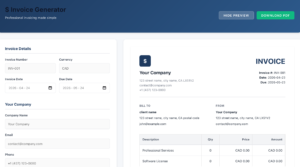
1. Open the tool at rgmotive.com/tools/invoice-generator
2. Enter your info: Business name, address, phone, email. If you’re a sole proprietor in Canada, you can use your personal name.
3. Enter client info: Company name, contact name, billing address.
4. Set invoice details: Invoice number (e.g., INV-001), invoice date, payment due date.
5. Add line items:
Service/product description
Quantity (hours, units, sessions)
Rate (per hour or flat fee)
The tool auto-calculates the line total
6. Apply tax:
GST (5%): Use for Alberta, BC, Manitoba, Saskatchewan, territories
HST (13%): Ontario
HST (15%): New Brunswick, Nova Scotia, PEI, Newfoundland
PST/QST: Select if applicable
Custom: Enter any rate for US or international clients
7. Add discounts if applicable: Enter a percentage or flat amount.
8. Add a note: Payment instructions, bank info, or “Thank you for your business!”
9. Download PDF: Hit the download button. Your invoice is ready to email or print.
Frequently Asked Questions
Do I need a GST number to use this invoice generator?
No. You can create invoices without a GST number. If you’re not registered for GST/HST, simply don’t check the tax box or set it to 0%.
Can I save my business info so I don't re-enter it every time?
The tool saves your info in your browser using local storage. Your data never leaves your device.
Can I add my logo to the invoice?
Yes. There’s a logo upload option in the tool. Upload any image and it appears in the top-left of your invoice.
Is the PDF invoice legally valid in Canada?
Yes. There are no specific format requirements for invoices in Canada. As long as it includes the required fields (name, date, amount, description, GST number if registered), it’s valid.
Can I use this tool to invoice US clients in USD?
Yes. You can enter USD amounts and adjust or remove the tax field as needed.
What if I need to send more than one invoice?
The tool auto-increments invoice numbers. Just refresh after downloading to start a new invoice.
Is there a limit on line items?
No. Add as many service line items as your invoice needs.